If you had Sora in your video workflow, you’ve probably already noticed it’s gone. OpenAI shut the tool down in 2026, and there’s no official replacement waiting in the wings. The good news: creators have already moved on, and the tools still running are each built around a different strength.
This guide covers what actually happened, what to do with any old Sora files, and the four tools creators are using now. No hype — just a plain look at what each option is built for.
Quick answer: what happens now that Sora is gone
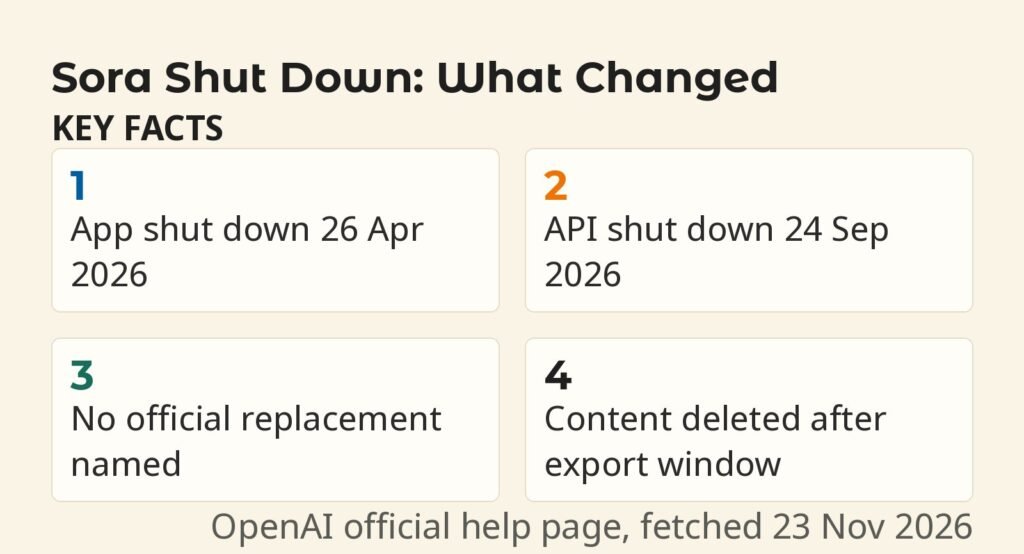
OpenAI discontinued Sora for web and app users on 26 April 2026, with the API following on 24 September 2026. There is no official replacement. Sora content is permanently deleted after any export window, so download anything you still need as soon as you can. The main alternatives creators moved to are Google Veo 3, Runway Gen-4.5, Kling AI, and Pika — and which one fits you depends on whether you need audio, creative control, proven production work, or fast iteration.
One honest note up front: TechKwiz has not run paid generations on any of these four tools. This is a sourced roundup based on each company’s official pages, not a hands-on test. Treat the feature descriptions below as what each tool claims to do, not what we verified with our own prompts.
What actually happened to Sora
Sora’s shutdown wasn’t a quiet sunset. OpenAI pulled the plug on the web and app versions first, in late April 2026, then ended API access about five months later. If you had an active workflow built around Sora, that second date matters: any integration you’d scripted against the API stopped working in September.
No official Sora successor has been announced. OpenAI has plenty going on elsewhere, but nothing that slots into the same text-to-video niche. That leaves creators with a choice: find a new primary tool or stitch together a workflow from several.
We covered Sora alongside Runway and Pika before this shutdown. If you want the longer backstory on how these tools compared while Sora was still alive, our Sora, Runway, and Pika comparison is still useful reading, even though a lot has changed since.
Can you still export your old Sora videos?
According to OpenAI’s official help documentation, Sora content will be permanently deleted once any final export window OpenAI offers has passed. If you still have access to an export option, use it now. Don’t wait to see what happens next week.
We have not been able to confirm the current status of any Sora export window or download tool on a live account. Before assuming you’re out of luck, check the official OpenAI help page for the latest. If an export button still appears in your account, download everything in one sitting — videos, images, project files, anything the interface will give you.
Once the deletion happens, there’s no recovery. Treat any lingering Sora project as already lost unless you act first.
Google Veo 3: the audio-first option
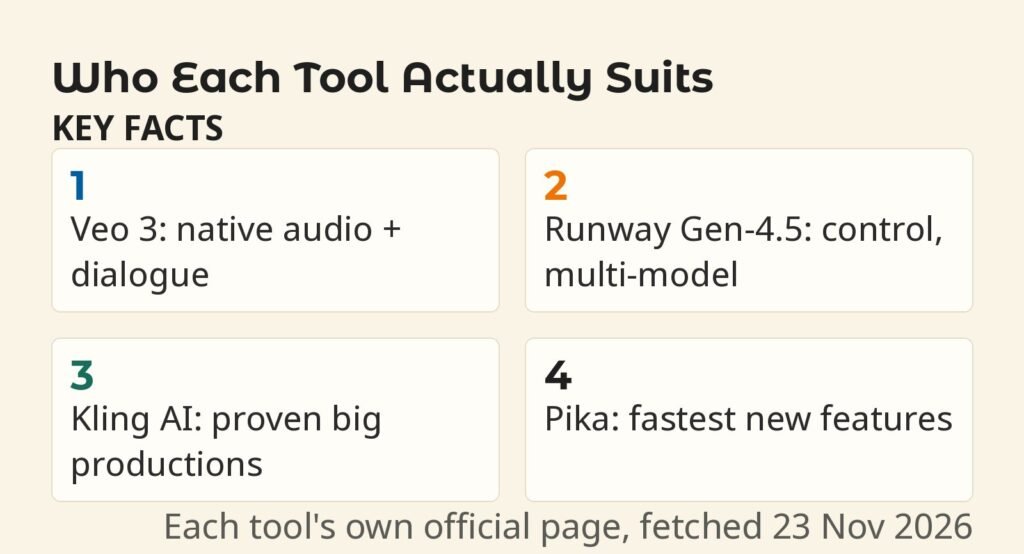
Veo 3 is Google’s current text-to-video model, and its biggest differentiator is audio. DeepMind’s own Veo page says Veo 3 lets you add sound effects, ambient noise and dialogue, “generating all audio natively” — so the sound isn’t bolted on afterward, it comes out of the same generation pass. For creators who make dialogue-heavy clips or scenes where timing matters, that’s a meaningful difference.
The same page says Veo 3 “delivers high quality, excelling in physics, realism and prompt adherence.” Prompt adherence is the one worth noting if “it didn’t make what I asked for” was your sticking point with text-to-video generally. We haven’t tested any of it, so read those three words as DeepMind’s claim about its own model, not a TechKwiz finding.
If your main frustration with Sora was flat, silent output, Veo 3 is the option most explicitly built to solve that. It’s not a personal pick — it’s just what the tool is actually designed to do.
For more on how Veo fits into a broader creator toolkit, our AI tools roundup covers several adjacent options, including Google’s ecosystem.
Runway Gen-4.5: creative control and multiple models
Runway’s platform has grown well beyond a single model. The pricing page lists Gen-4.5 as one model option, but it also sells generations on Kling 4.0 and Seedance 2.0 Pro. That’s worth knowing: Runway isn’t just “Runway’s own model,” it’s a storefront for several.
On the Standard plan, the list price is $15 a month, dropping to $12 a month if you commit to annual billing (Runway’s page frames that as “Save $36/year”), with 625 credits included per month. Those numbers come from Runway’s public pricing page and are worth double-checking the day you read this, since plans change.
Runway’s pitch is creative control. Its own page lists the Standard plan as including access to all its AI video and image models, five parallel video or image generations, music, voice and sound-effects generation, 4K upscaling, no watermarks, and up to three projects. If you liked Sora’s flexibility but wanted more handles to pull on the output, that’s the feature list closest to it here.
We’ve covered AI tools for social media management separately, and some of those workflows pair naturally with Runway for short-form video. See our social-media AI tools roundup for the full picture.
Kling AI: the tool with big-production credits
Kling AI has the kind of real-world production resume most AI video tools don’t. According to its own site, the AI short film “L’Ultimo Uomo Reale” won a Silver and a Bronze at the 2026 Cannes Lions International Festival of Creativity; the Amazon Prime series “House of David” was, Kling says, the first Hollywood production to publicly disclose large-scale AI video generation and has passed 44 million views worldwide; and all 135 minutes of the feature film “Odysseus: The Fall,” directed by Ash Koosha, were generated with Kling AI. Those are named titles you can go and check, not a vague “used by major studios” line.
We have not confirmed those production credits against independent sources, and we’re not stating a Kling price because the source we reviewed didn’t include one. What we can say: if you care about a tool with a track record in professional film and television, Kling is the only option in this list putting those credits front and center.
That doesn’t make Kling automatically better for a TikTok creator. It makes it interesting for anyone whose work skews toward narrative, cinematic, or production-grade output.
Pika: newest features, fastest iteration
Pika moves fast. The company announced Pika H3 Flex on 29 October 2026 and followed it with the Pika Enact research preview on 18 November 2026 — two releases in under a month. If you want a tool that’s constantly shipping experimental features, Pika is the one that’s been doing exactly that.
We’re not stating a Pika price because the source we reviewed didn’t include one, and we haven’t tested the new features. What the two announcements do tell you is the shape of the product: H3 Flex is described as a post-trained MiniMax H3 model built for creative iteration, taking up to 12 references, five separate audio stems, finishing at up to 4K, with open weights. Enact is explicitly a research preview, aimed at talking to a cast and rehearsing performances rather than one-shot clips.
If your style is to try the newest thing before anyone else, Pika is the natural fit. If you’d rather wait for features to stabilize, it’s probably not your first choice — and that’s a reasonable position.
How to pick a Sora replacement by use case
No single tool wins for everyone. Here’s the plain-language breakdown based on what each tool actually claims to do:
Need native dialogue and audio? Google Veo 3 is the only option here built around audio-first generation. If sound matters more than pixel-level control, start there.
Want creative control and access to multiple models? Runway gives you Gen-4.5 alongside Kling 4.0 and Seedance 2.0 Pro generations, all inside one platform. You’re not locked into one model’s strengths.
Want a tool with proven production credits? Kling AI is the one citing named films and festival wins. That’s relevant if you’re pitching clients who ask “what has this tool actually shipped?”
Want the newest features first? Pika’s release cadence is the fastest, though the tradeoff is that new features come in research-preview form.
If you’re replacing Sora in a broader AI workflow, it helps to think about where video fits alongside text and image tools. Our GPT-6 and ChatGPT guide covers the text-generation side, which many creators still pair with video output.
What to do this week if Sora was your main tool
First: check your Sora account for any export option and download everything immediately. The deletion language is clear — once the window closes, content is gone permanently.
Second: pick one alternative and run a small test. You don’t need to evaluate all four at once. Match the tool to your primary use case from the breakdown above, sign up for a free tier or entry plan, and generate a few clips with prompts you already know well.
Third: keep your old prompts. The exact wording that worked in Sora won’t map one-to-one onto any new tool, but having your historical prompts as a starting point saves time when you’re learning a new model’s quirks.
Fourth: set a budget before you commit. Runway’s Standard plan lists at $15 a month, or $12 a month with annual billing, with 625 credits — the only price we’re stating because it’s the only one in our sources. For the others, check live pricing the day you sign up.
Recap: the short version
Sora is gone, and there’s no official replacement. Export any remaining files now. The four tools creators have moved to — Google Veo 3, Runway Gen-4.5, Kling AI, and Pika — each solve a different problem: audio, control, production credits, or iteration speed. Match the tool to your actual use case, set a budget, and start testing this week rather than waiting for a Sora successor that isn’t coming.
Get new guides first
Browser alerts for new TechKwiz guides.